Discovering works that otherwise would have been overlooked
Easy - New
Ben doesn’t go to museums often and feels very out of touch with the world of art appreciation. When he goes to a museum, he is often drawn most to the famous pieces everyone is crowding around, or the more unconventional pieces, like WCMA’s “Our Love is Bigger than and AIDS Quilt” that have extra-visual elements that draw him in. He thinks he may like some of the other pieces in the museum, but he just doesn’t know how to find the ones he may really like, and often gets tired and loses motivation before completing a tour of the every exhibit. He’s tried asking museum staff where he could find pieces he’s likely to enjoy; however, he has a lot of trouble describing to them what these pieces may look like, so they generally can’t offer very helpful advice.
Conveying personal artistic preferences
Hard - New
Greg loves visiting museums and finding new objects to think about and engage with – he also has a personal passion for computer science and a deep love of medieval poetry, among other unique interests. When he visits a new museum, he thinks about his various passions and makes connections between objects and ideas. He wants a more concrete way to connect his interests, academic and personal, to his experiences engaging with art. Greg wants to find connections between his interests and his favorite artists and styles (Dalí, surrealism, abstract, Rothko, colors, etc.) to discover new art and interests based not only on his aesthetic tastes but also his passions for code and the poems of Marie de France. When he finally makes it through WCMA’s doors, he comes armed with pictures of certain pieces that are on display and some obscure works from the collection that have piqued his interest – he knows where to go and what to look for. This helps him connect his unique personality and interests to the objects and spirit of WCMA. He makes a beeline for the Object Lab and begins reading the descriptions for courses, smiling to himself as he sees other unique connections to art across academic disciplines.
Learning about the curator’s perspective and vision for the exhibit
Easy - Existing
Olivia is an art buff and knows every piece of art by its time period, medium, and artist before ever stepping foot in the museum. Her curiosity stems from how the art is spatially combined, setup, and displayed. She wants to know how light, sound, and even air temperature are manipulated for each piece and various exhibits as a whole. In short, it has always been Olivia’s dream to be a curator, but weekend visits to WCMA will have to do. She knows that pieces, museums, and collections are sometimes put together to be interpreted be each person differently and have no set meaning, but nonetheless, Olivia is interested in how professionals in the field have viewed, envisioned, and curated the art. She wants to gain a more in depth understanding and appreciation for each museum she visits. Unfortunately, most curators aren’t on site for chats or tours. Even at places like WCMA, where the combination of academics and art is part of the mission, it’s not always possible for Olivia to satisfy her intellectual curiosity in a single daily visit.
Continued engagement with the users favorite or most memorable pieces
Moderate - New
Cal is someone who enjoys visiting museums, but he doesn’t get to do it all that often. Being in his second year at Williams and hearing so much about WCMA from various friends, he decides to go one afternoon. After looking through a particular exhibit, Cal realizes how applicable a series of photographs are to one of his current classes. He knows he has to right a research paper at the end of the semester that incorporates non-text based sources. He reads the description of the photos and tells himself he’ll remember in a few weeks. As the paper due date approaches, Cal returns to WCMA with a notebook to do some brainstorming for a rough draft only to find that the exhibit has been switched and the pictures now replaced by a series of sculptures that don’t relate at all to his work. He doesn’t have the time to sift through the online collection and can’t remember which exact photos he was looking at to ask the museum staff. He wishes he had somehow “bookmarked” those pieces for himself and was able to retrieve them now.
Learning more about the collection as a whole
Moderate - Existing
Sarah is in town to check out the Williamstown museums. She first visits the Clark and MassMoCA and is impressed with their large collection on display. Upon completing her final visit of the weekend to WCMA, she realizes she really liked the diverse collection on display, but was sad she didn’t get to see more pieces. She tries going on the WCMA website to see if they perhaps have a digital inventory of their full collection. She finds that they do have such a thing, but gets quickly overwhelmed by the incredible number of pieces. Feeling lost, she tries narrowing it down with the search bar, but is still forced to scroll through pages of works she’s not interested before finding one she really likes. Once she gets home from her trip, a friend asks her if she liked WCMA’s public art pieces scattered across the campus. Sarah laments that she didn’t even know there was public art to be seen, and feels like she missed out on a big part of WCMA’s collection.
Agency in one’s museum experience
Hard - Existing
Leora does the same thing every time she goes to WCMA to see the latest exhibition – she goes upstairs, walks through each gallery with a meandering, listless gait and then goes downstairs to check out the Object Lab and any special works on display. This time, she thinks, she will take more initiative – she will have an active visit and her experience will be defined by her and her unique interests. She walks through the door and is instantly befuddled by the pink column with arrows pointing five different ways – should she go upstairs or downstairs, left or right? She doesn’t know what is currently on display and feels at a loss. Resigned, she goes upstairs and begins looking at every work, one by one, and feels robotic. Leora wishes there were some way to plan her experience beforehand so that she could more dynamically find, engage with, and remember works that are meaningful to her. She just wants to give herself a unique experience with art without falling into the same old patterns.
Project Design Check-In
Kiosk Design
This design would feature a series of kiosks throughout the museum. Each visitor would create a profile of sorts at the first kiosk right by the door, that would be associated with and ID or a badge that would allow them to access their personal profiles at each successive kiosk. The kiosks would allow visitors to interact with the design throughout their visit without having to download an app that could prove distracting. The kiosks would track visitors preferences, offer personalized navigation, introduce the entirety of WCMA’s collection, provide the option to bring home reminders of the pieces they liked, and much more. Additionally, visitors’ profiles would always be saved, so they can pick up where they left off each visit and continue to specify their preferences, allowing the kiosks to offer more specific and differentiated information.
Agency in one’s museum experience
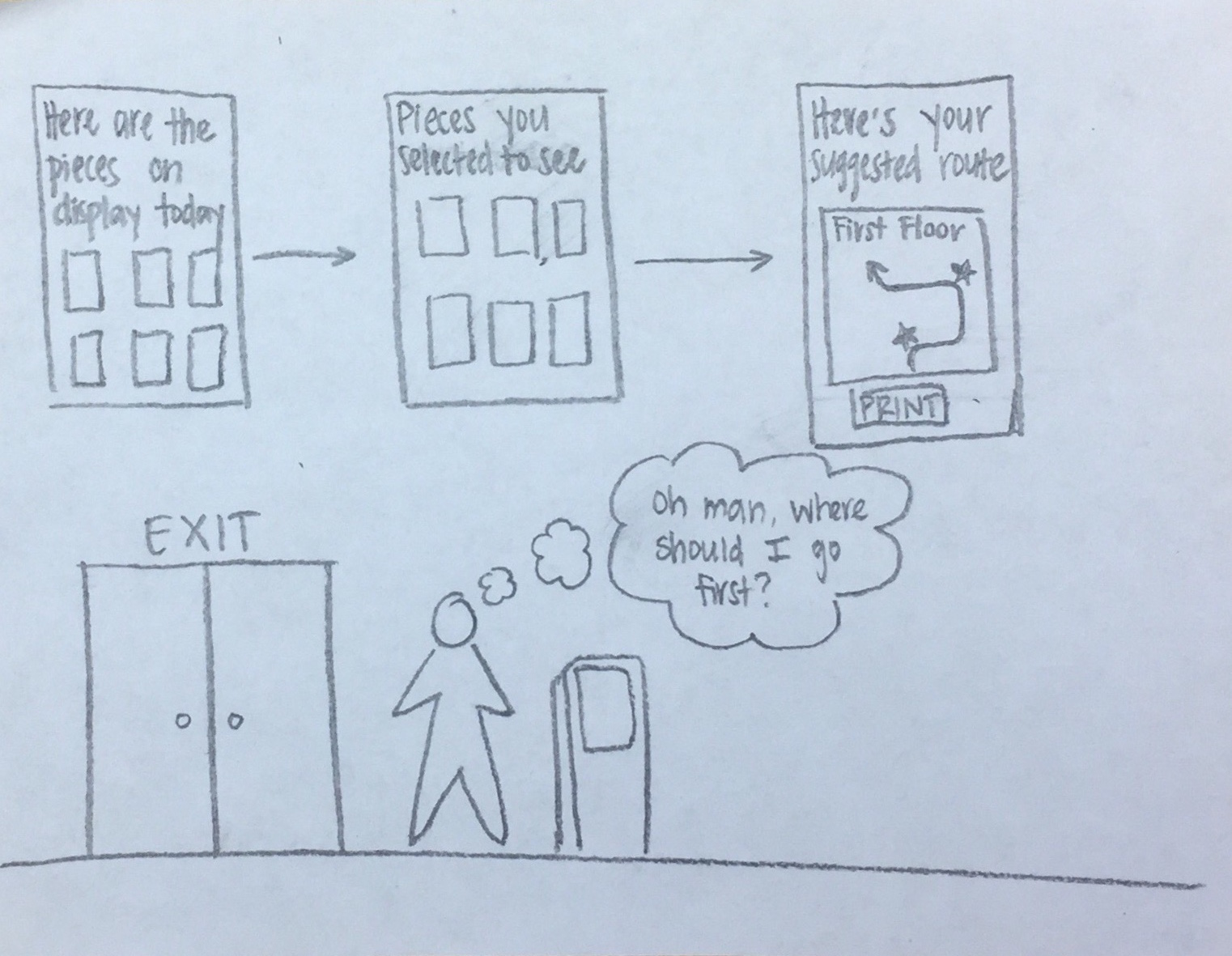 At the kiosk by the front door, visitors could see a summary of the pieces on display that day. After selecting the ones they’re most interested in seeing, the kiosk would display a suggested route through the museum to see those pieces. The route could be printed out so the user could carry it around with them.
Conveying personal artistic preferences
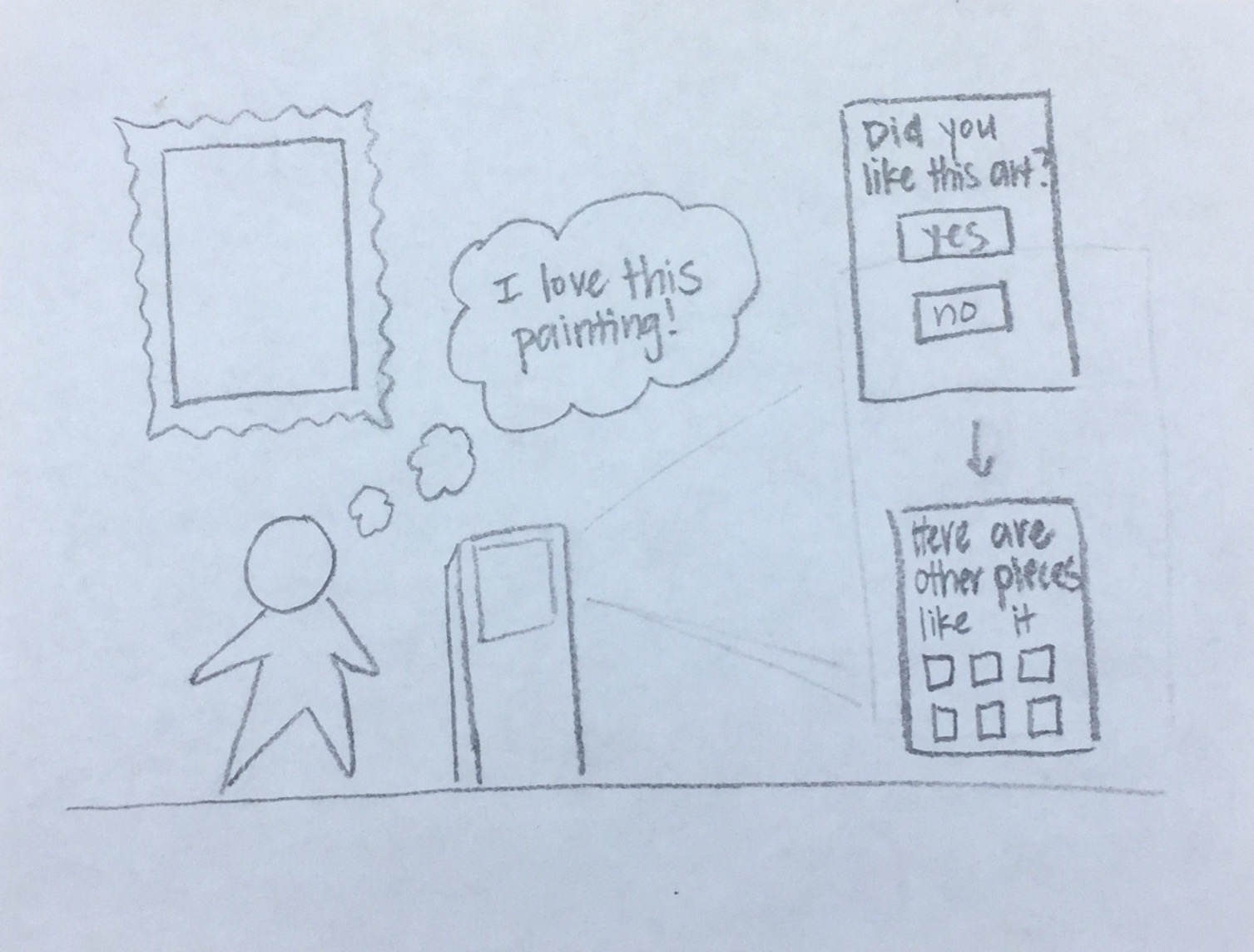 Throughout the museum would be kiosks where visitors could indicate whether they liked a piece or not. If they did like it, the kiosk would display a page of similar pieces both on display currently and in the digital collection. These preferences would be stored throughout the visit and summarized at the end.
Learning more about the collection as a whole
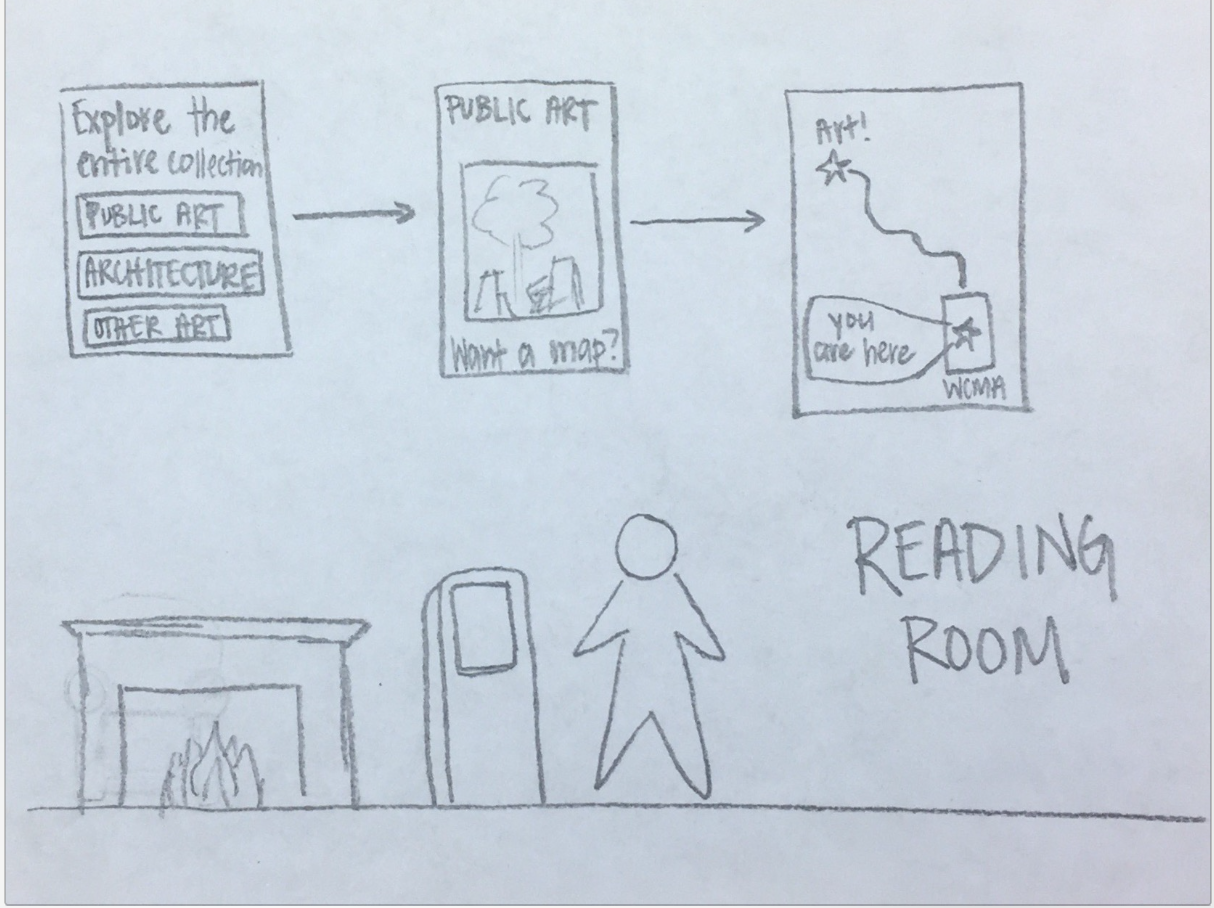 In the Reading Room there would be a kiosk that allowed visitors to explore the entire WCMA collection, not on display. Features would include a sorted collection of the digital pieces, information about the architecture of the building itself, and printable maps to public art.
Continued engagement with the users favorite or most memorable pieces
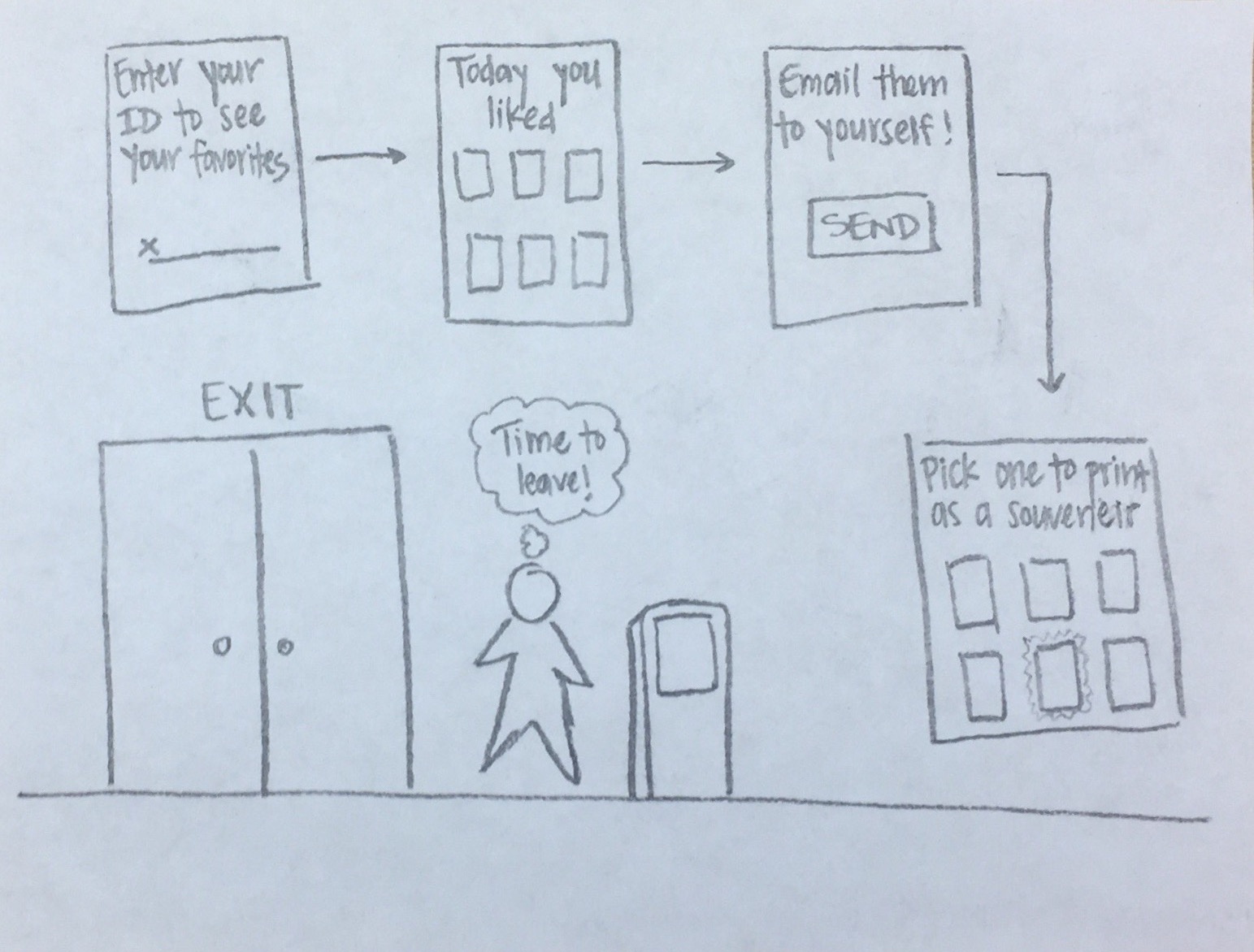 At the end of a visit to WCMA, a user could enter their ID into the kiosk by the door to see the pieces they liked during their visit. They can email digital images of these pieces (sourced from WCMA’s digital collection) to themselves and print out a high quality physical copy of one of the pieces to take home as a souvenir. Being able to print out an image could be a incentive for visitors to use our design in the first place.
Phone App Design
This design would come in the form of an app on smartphones. Visitors could download the app at any time and create a short profile on themselves. At the very least it would create an account with their name. The design would serve four main purposes. Broadly these are wayfinding, discovering and connecting interests, learning from the eyes of a curator, and bookmarking pieces for later use. The app would show users where to begin their museum experience by getting input in the form of user interests or suggesting pieces based on where a user has spent the most time. It would then give them the ability scan pieces and learn more, but importantly bookmark them. If the curation of exams is of interest, then users can opt in and out of following a predetermined path with interesting facts and tid bits discoverable along the way. At any point, users can see which exhibits or pieces they have missed (if any) and how to navigate to them if they so desire. A final feature of the app is letting users see pieces of interest that are not on display, but are still in the WCMA collection by searching for key tags.
Task: Continued Engagement with users favorite or most memorable pieces
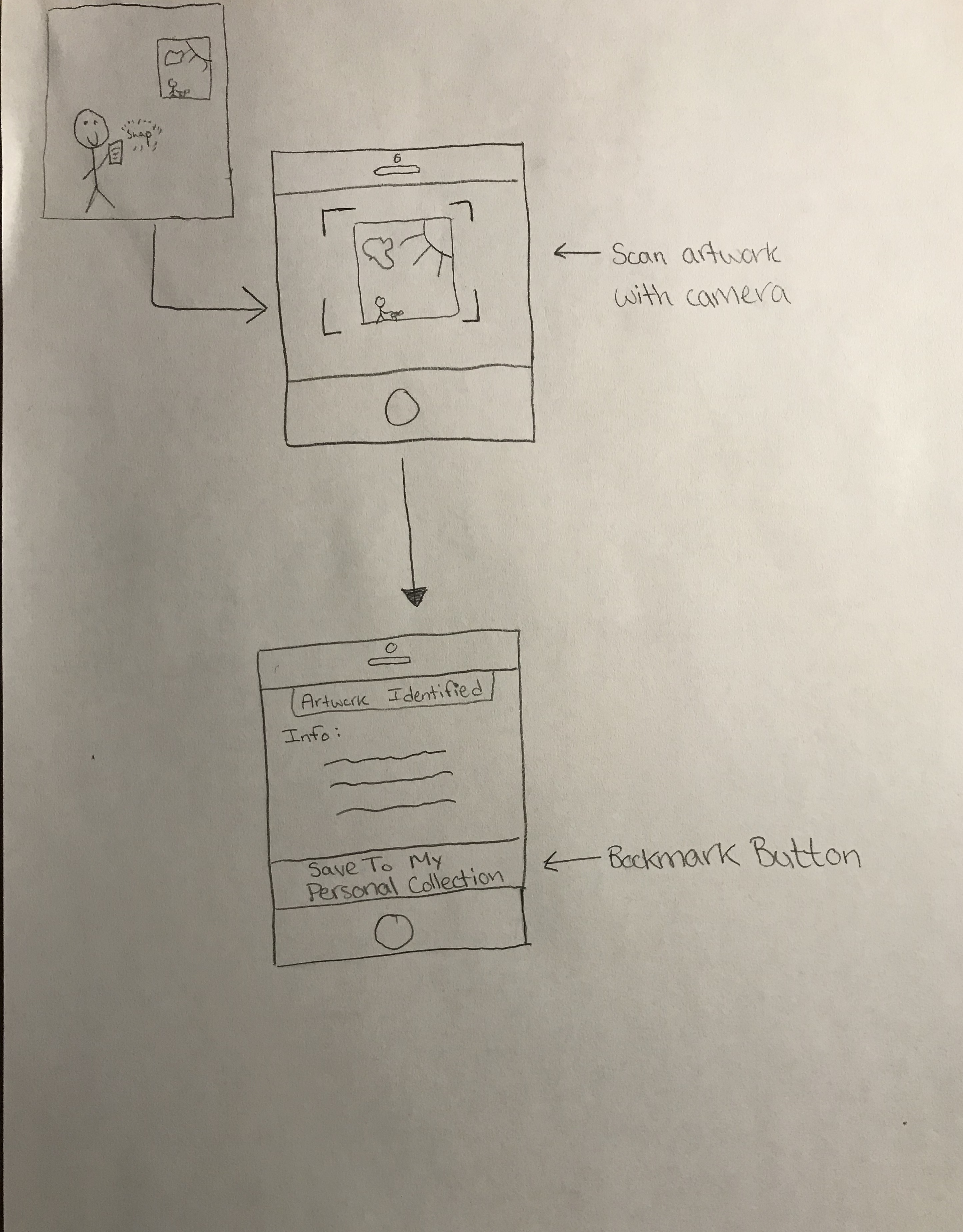 Upon visiting every piece, the user would be able to scan it, bringing up a digital copy and its information. There would then be the option for users to add it to their “Personal Collection” that houses all of the art they find interesting, memorable, or just want easy access to in the future.
Task: Learning about the curator’s perspective and vision for the exhibit
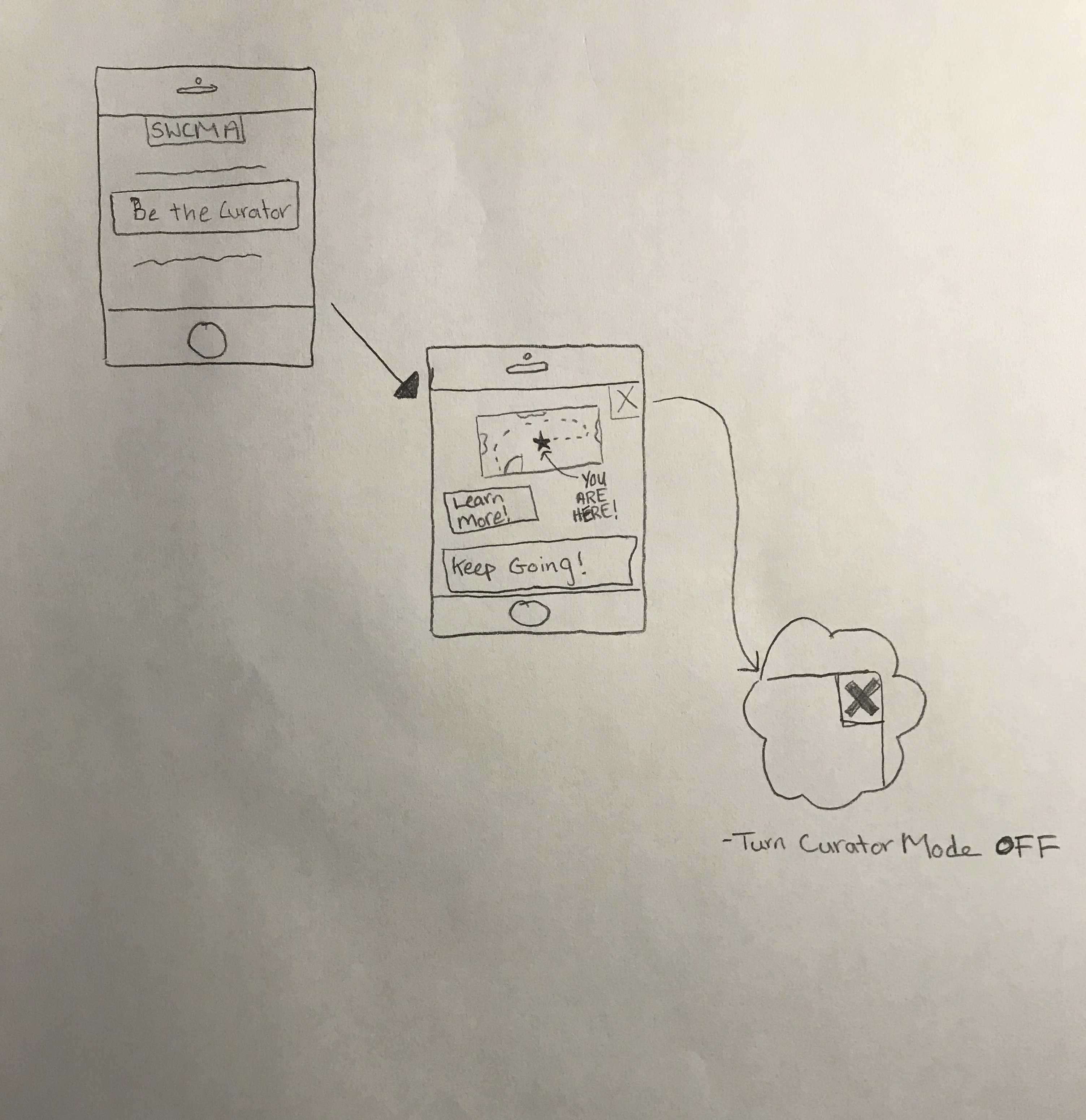 The app would have a “Be the Curator” option where individuals could opt to experience an exhibit in the shoes of the curator. In this way visitors could walk the path(s) envisioned by the curator and learn the intricacies of the exhibit. It would be easy to pause or turn off if users so desired, and would at its most basic level function as a wayfinding guide, only giving more information on the user’s request.
Task: Conveying personal artistic preference
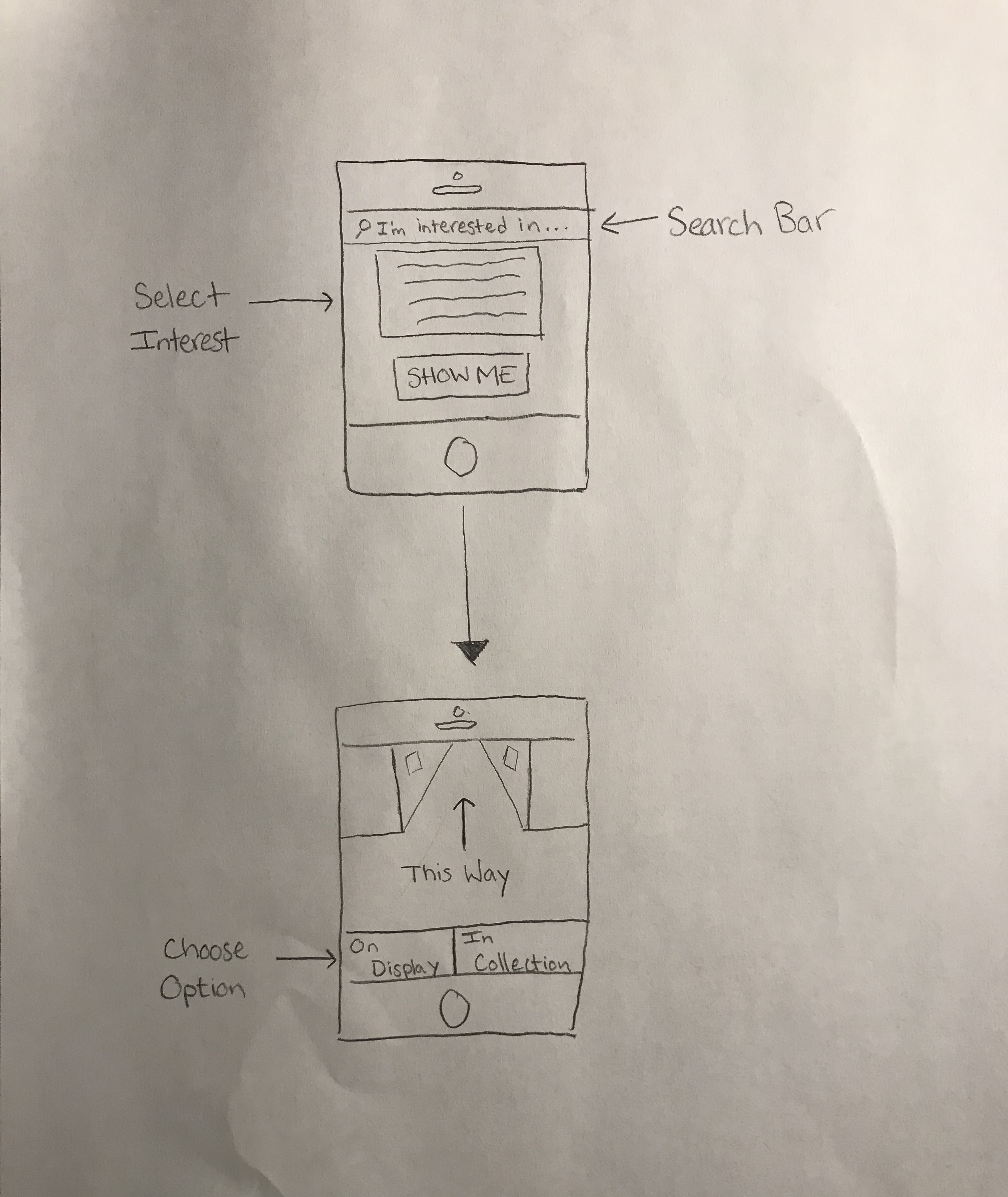 This search options allows users to narrow down by any subject matter imaginable. The pieces of art would all be coded with tags, and then upon a search of one or more tags, they could learn more about the art and visit it in person if it is on display or virtually on their phone if it is not on display but in the collection.
Task: Discovering works that otherwise would have been overlooked
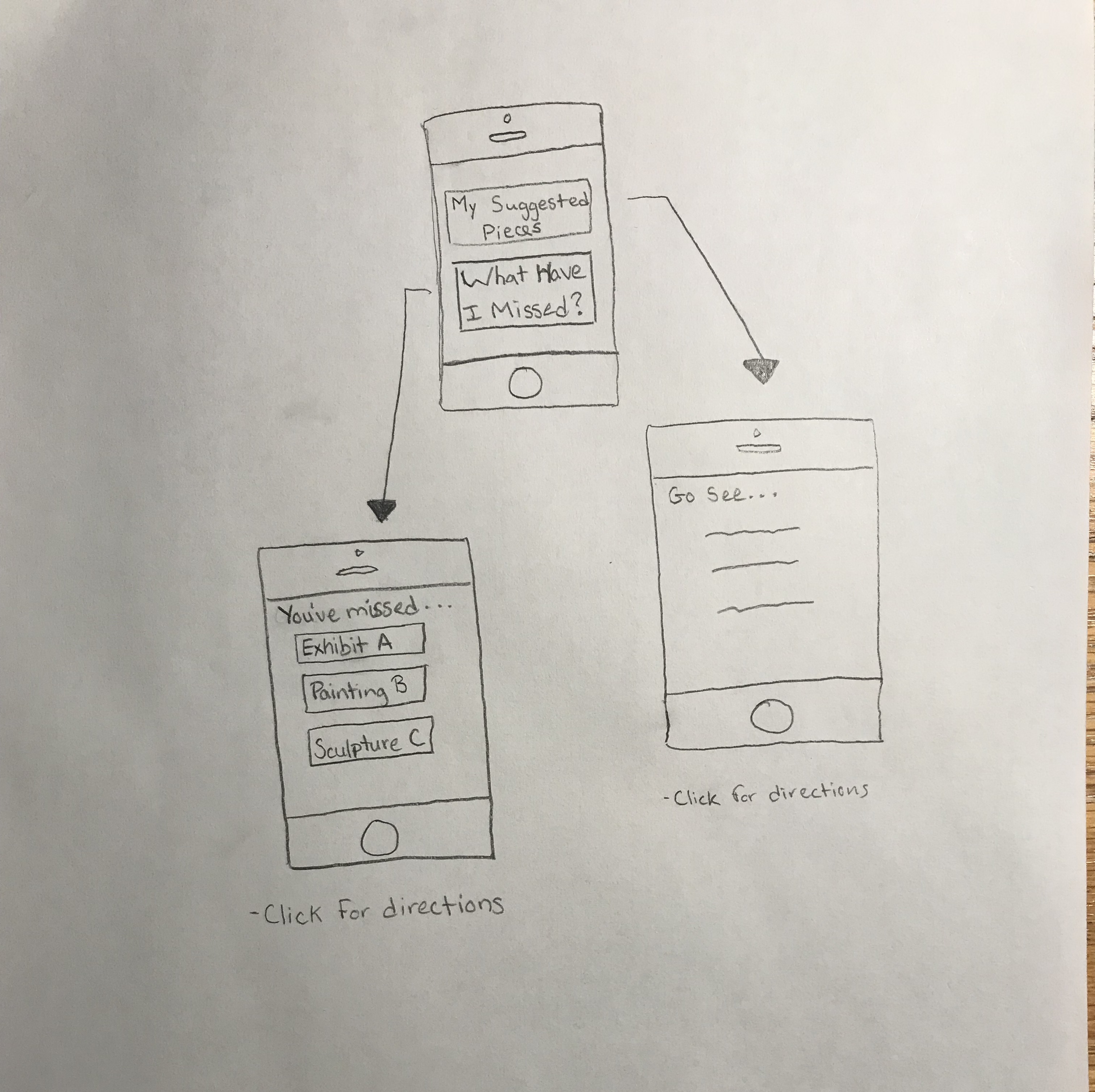 In the app there would be a section that tracks your progress through the museum. If by chance you skipped an exhibit or passed by a piece of art quickly, you would be able to go back and see all the art you’ve “missed” and/or see which art has been suggested for you that you might have missed.
Web App Design
This design is a web application for WCMA’s website that focuses on helping users plan their visit to the museum around objects in the collection (both on display and otherwise). First, a user will be able to convey and organize their artistic preferences by building a profile based on quiz-like prompts designed to create a holistic image of an individual’s tastes. Next, the app will generate an interpretive map that highlights unique items on display in current exhibitions and offers customizability based on a variety of possible factors (users can choose which of their preferences they want to give priority in the generated path). Third, users will be able to click whether they found a piece “Compelling” or “Eh” and will be invited to peruse a “Similar Pieces” section for each of their favorite works that showcases visually or historically similar works in WCMA’s online collection. Finally, any piece that the user views through the app as well as the path itself can be saved to the user’s account, shared with the user’s friends or to their personal social media/email, or printed at WCMA where a physical copy of the map will be awaiting the visitor’s arrival.
Conveying personal artistic preferences
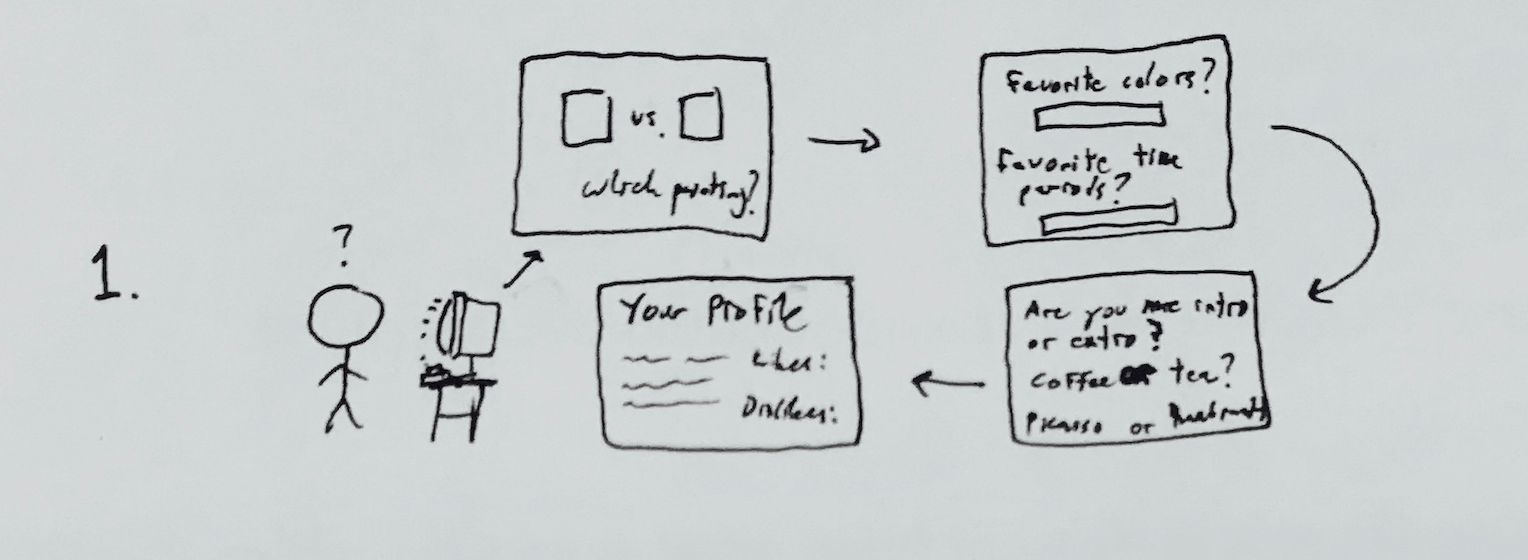 Whether on a desktop or mobile device, a user can follow quiz-like prompts and fill in textboxes to build a personal profile. Prompts will be a mixture of open-ended spaces to fill in things like favorite colors, artists, time periods, types of works, and styles but will also include humorous and seemingly unrelated questions like “What is your spirit animal?”, “Coffee or tea?”, or things of this nature. The web app will use this data to generate paths for the user that include works that they are likely to enjoy or find interesting.
Discovering works that otherwise may have been overlooked
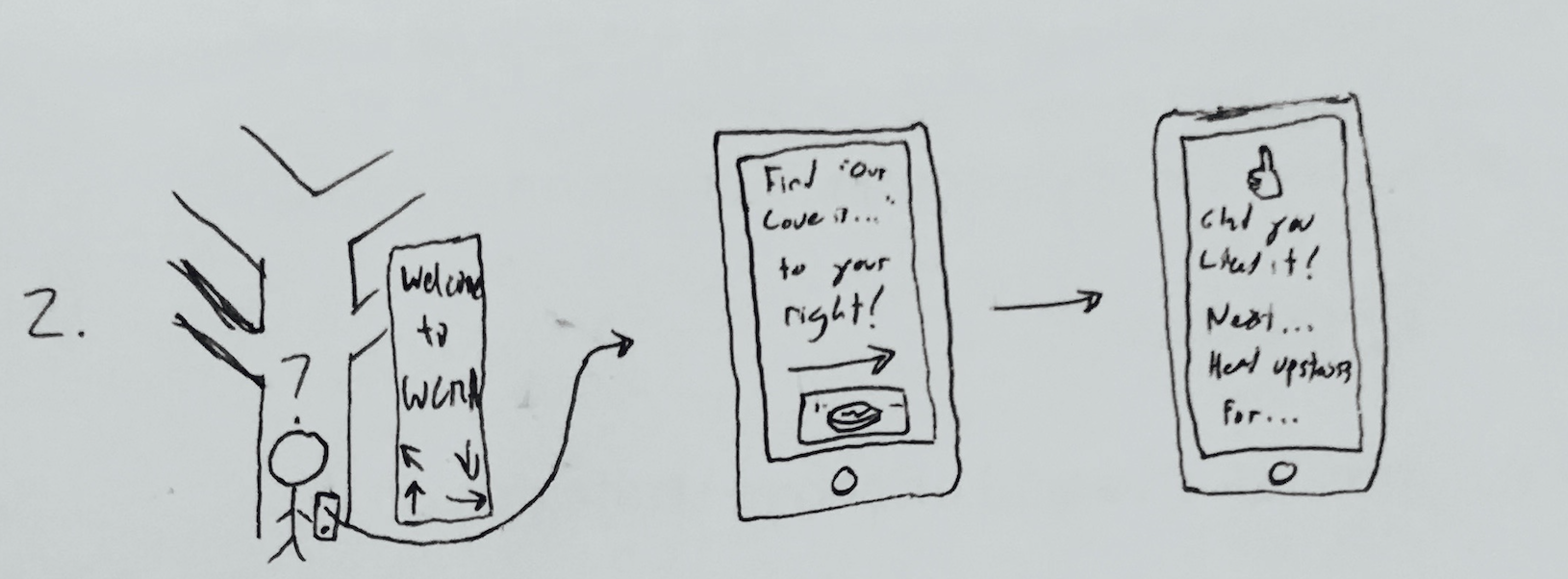 A user will be told which turns to make at the museum to find different works on display. When they arrive at a work on their path, they will be prompted to indicate whether they enjoy the piece or not. Based on their reaction, the path will adjust to suggest other works on display and then direct the visitor to that work.
Learning more about the collection as a whole
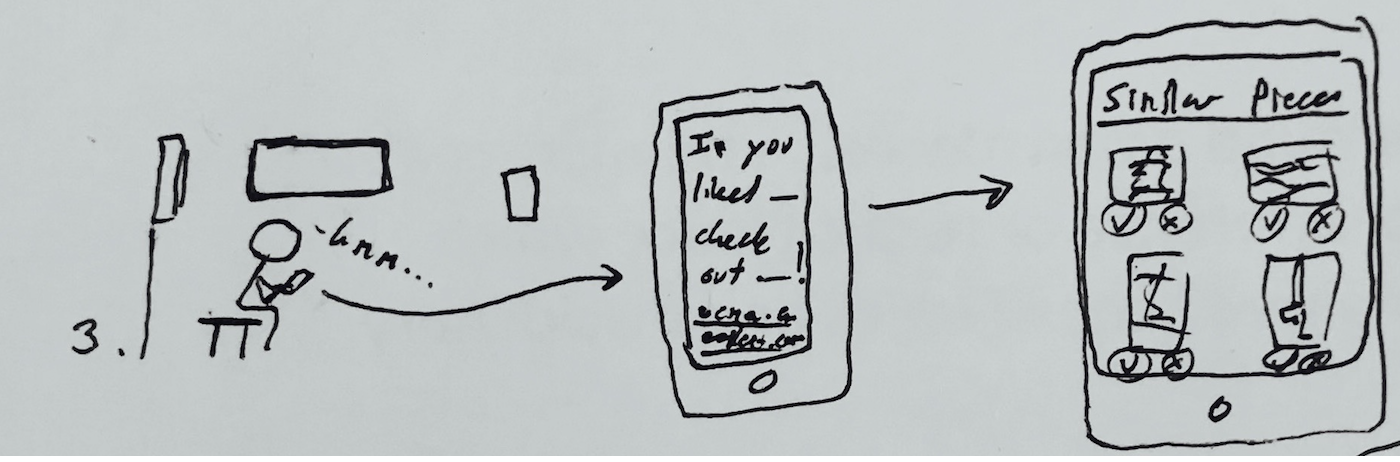 Throughout the path, the user will have the option to look at a “Similar Pieces” section for each work on their path (or in the entire collection if they wish to peruse through all of the works). This section will include pieces on and off the walls and will have the option to indicate whether a user likes or dislikes each piece. Their responses will help the app understand better which pieces to suggest to them in the future.
Continued engagement with users’ favorite or most memorable pieces
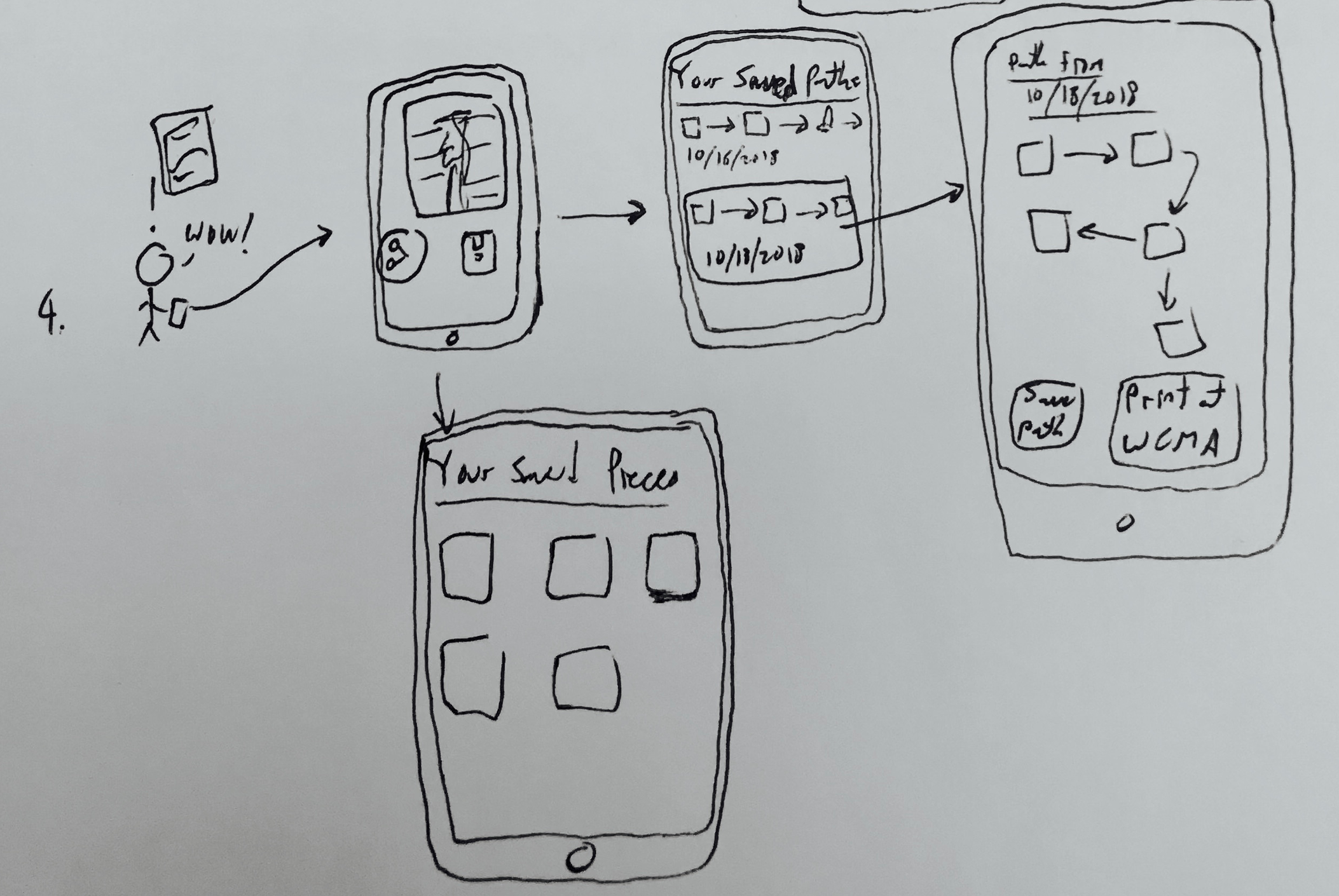 For each work and for each path, the user can choose to save and/or share their path or work. The paths will be organized by the days on which they were generated and the works by either artist, date, or title. Buttons for sharing to social media, email, or text will allow users to show their paths and favorite pieces to others while the save option will allow the user to download an image of a specific work and its placard or an image of their path. They will also have the option to print their path at WCMA so that it will be waiting for them when they arrive.